

A mortgage calculator is a financial planning tool that estimates your monthly repayments and total borrowing capacity based on property price, deposit, interest rate, and loan term. For first-time buyers in the UK, learning to use a mortgage calculator when buying a home is the most direct way to understand what you can realistically afford before speaking to a lender. Calculators also help you factor in costs like Stamp Duty Land Tax relief, which applies at 0% on properties up to £300,000 for first-time buyers in England. The Financial Conduct Authority requires lenders to carry out affordability checks, so arriving at those conversations with a clear picture of your finances puts you in a much stronger position.
What inputs do you need to use a mortgage calculator accurately?
Getting reliable results from a home loan calculator depends entirely on the quality of the figures you enter. Rough estimates produce rough outputs. Accurate inputs produce numbers you can actually plan around.
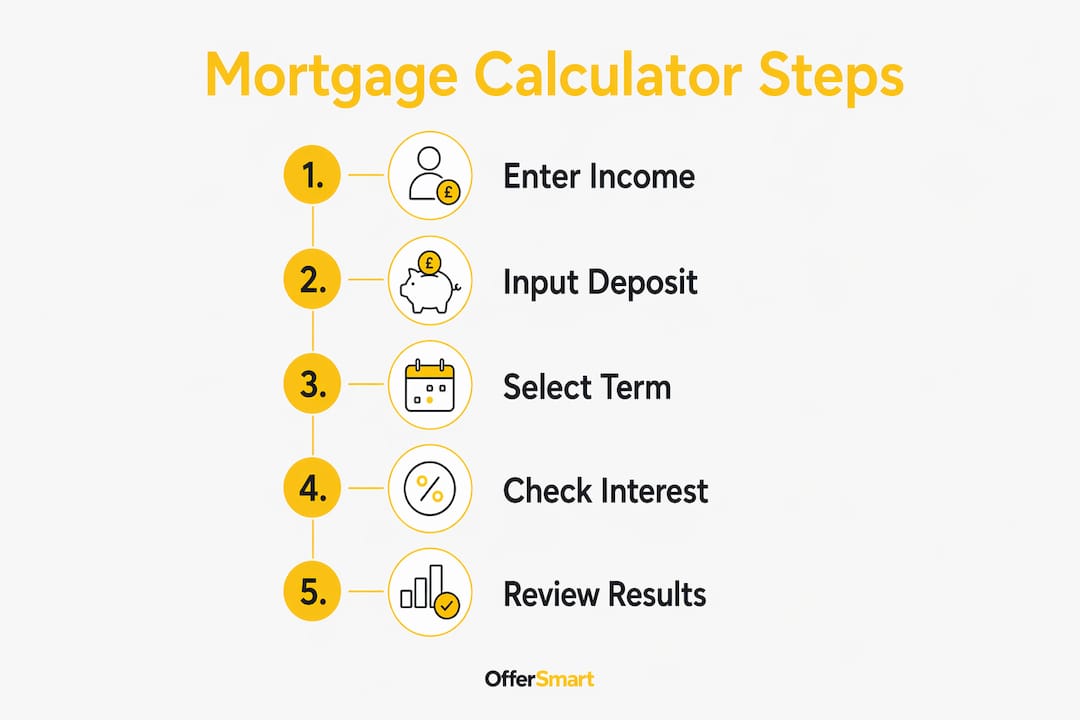
The core inputs every UK mortgage calculator requires are:
- Property price. The full asking or agreed purchase price of the home you want to buy.
- Deposit amount. Your upfront contribution. This determines your Loan-To-Value (LTV) ratio, which lenders use to set your interest rate. A lower LTV generally means a better rate.
- Mortgage term. UK mortgage terms typically range from 25 to 35 years, with most calculators defaulting to 25 years. A longer term lowers monthly payments but increases total interest paid.
- Interest rate. Use the rate from a lender's current product range or a rate quoted to you directly. Avoid using a generic placeholder figure, as even a 0.5% difference shifts your monthly payment noticeably.
- Repayment type. Choose between a repayment mortgage, where each payment reduces the loan balance, or an interest-only mortgage, where you pay only the interest and repay the full loan at the end of the term.
- Income (optional). Many calculators include an affordability section where you enter your annual salary. This generates a borrowing estimate based on standard salary multiples.
Using verified payslips and bank statements rather than rough income estimates improves the reliability of your results significantly. Accurate inputs lead to more trustworthy affordability indicators.
Pro Tip: Run the calculator twice. First with your ideal deposit, then with a deposit that is £10,000 lower. The difference in monthly payments and interest rate tier often makes a compelling case for saving longer before buying.

How do you interpret the results from a mortgage calculator?
A mortgage calculator estimates monthly payments using the PMT formula, which factors in loan amount, interest rate, and loan term. Understanding what the outputs actually mean is just as important as entering the right figures.
Monthly repayment figure
The monthly repayment figure shows what you would pay each month under the conditions you entered. It is a planning estimate, not a lender's offer. The figure assumes a fixed rate for the full term, which rarely reflects reality since most UK buyers remortgage every two to five years as fixed deals expire.
Borrowing estimate
The borrowing estimate is calculated using salary multiples, typically four to four and a half times your annual income. Lenders, however, deduct committed monthly outgoings including childcare costs, debt repayments, and pension contributions before applying those multiples. This rigorous assessment often lowers your actual approved borrowing compared to what the calculator shows.
Approved borrowing can be £50,000 to £100,000 lower than a basic calculator estimate. That gap matters enormously when you are budgeting for a specific property.
Loan-To-Value and interest rates
Your LTV ratio directly affects the interest rate a lender will offer you. A buyer with a 10% deposit faces a 90% LTV and will typically pay a higher rate than a buyer with a 25% deposit at 75% LTV. Running the calculator with different deposit sizes shows you exactly how much your monthly payment changes as your LTV improves.
Stamp Duty costs
First-time buyer Stamp Duty Land Tax relief in England applies at 0% on properties up to £300,000, rising to 5% on the portion between £300,001 and £500,000, with no relief above £500,000. This relief affects your total upfront costs, not your monthly repayment, so factor it separately into your purchase budget.
What are the limitations of mortgage calculators?
Mortgage calculators are planning tools, not lending decisions. Knowing where they fall short helps you avoid costly surprises.
-
Hidden purchase costs are excluded. Many calculators exclude arrangement fees, valuation charges, legal fees, buildings insurance, and Stamp Duty from their outputs. These costs can total several thousands of pounds and must be budgeted separately.
-
Salary multiples ignore your actual outgoings. Basic calculators apply a simple multiple to your gross income. Lenders assess your net disposable income after all committed spending. The result is often a materially lower approved amount.
-
Stress testing is not modelled. Lenders conduct affordability stress tests assuming mortgage rates 2 to 3 percentage points above your contracted rate. A calculator set to 4.5% does not show you whether you could afford payments at 7%. Running this scenario manually is the only way to check.
-
Lender underwriting is not replicated. Basic calculators do not reflect lender-specific underwriting models. Affordability varies depending on lender policies and your individual borrower profile. A Decision in Principle from a lender is an initial check, not a final approval.
-
Interest-only risks are understated. An interest-only calculator shows a very low monthly payment, which can look attractive. It does not show the full loan balance you must repay at the end of the term, which requires a separate repayment vehicle.
Pro Tip: After running your mortgage estimator tool, add at least £3,000 to £5,000 to your total budget for legal fees, surveys, and moving costs. This single adjustment prevents the most common first-time buyer budget shock.
Step-by-step guide to using a mortgage calculator for home buying
Follow these steps to get the most reliable picture of your home financing options before you make an offer.
-
Gather your financial documents. Collect your last three months of payslips, your most recent P60, and three months of bank statements. These give you accurate income and outgoings figures to enter.
-
Set a realistic property price. Use the asking price of a property you are genuinely considering, not a wishful figure. If you are still searching, use the average price for the type of property you want in your target area.
-
Enter your deposit amount. Input the exact savings you have available after reserving funds for purchase costs. This gives you your true LTV and the most accurate rate tier to use.
-
Select your mortgage term. Start with 25 years as a baseline. Then run the same figures at 30 years to see how the monthly payment drops and how much extra interest you pay over the longer period.
-
Input a current interest rate. Check a lender's published rates or use a rate from a mortgage broker quote. The mortgage approval process involves rate selection at application, so using a real rate makes your estimate far more useful.
-
Run multiple scenarios. Change one variable at a time. Try a higher deposit, a shorter term, or a rate 1% higher than your current quote. This stress-tests your budget and shows you where your financial limits actually sit.
-
Cross-check with a mortgage advisor. A calculator gives you a starting point. A qualified mortgage advisor applies lender-specific criteria to your full financial profile and can tell you which products you are likely to qualify for.
The table below shows how changing the mortgage term affects monthly payments and total interest on a £250,000 loan at 4.5%:
| Mortgage term | Monthly repayment | Total interest paid |
|---|---|---|
| 20 years | £1,582 | £129,680 |
| 25 years | £1,389 | £166,700 |
| 30 years | £1,267 | £206,120 |
| 35 years | £1,184 | £247,280 |
The figures above illustrate a clear trade-off. A longer term reduces your monthly outgoing but adds tens of thousands of pounds in total interest. Knowing this before you commit helps you choose a term that fits your long-term financial plan, not just your immediate budget.
Key takeaways
A mortgage calculator is a planning tool that estimates repayments and borrowing capacity, but lender affordability checks, stress tests, and excluded purchase costs mean the final approved amount is often lower than the calculator suggests.
| Point | Details |
|---|---|
| Accurate inputs matter | Use verified payslips and bank statements, not rough estimates, for reliable results. |
| Borrowing estimates are not offers | Approved amounts can be £50,000 to £100,000 lower than calculator figures after lender stress tests. |
| Hidden costs add up | Arrangement fees, legal costs, and surveys can total several thousands of pounds not shown in results. |
| Term length changes total cost | A 35-year term versus a 25-year term on the same loan can add over £80,000 in total interest. |
| Stamp Duty affects upfront budget | First-time buyers in England pay 0% on properties up to £300,000, reducing initial purchase costs. |
Why I think most first-time buyers use calculators the wrong way
Most buyers open a mortgage calculator and immediately search for the maximum borrowing figure. I understand the impulse. You want to know the ceiling so you can set your property search budget. The problem is that the ceiling a calculator shows and the ceiling a lender approves are often very different numbers.
The more useful approach is to start from the monthly payment you are genuinely comfortable paying, not the maximum the calculator will generate. Work backwards from that figure to find the loan size and property price that fits. This is the method financial experts recommend for stress-testing affordability against future rate rises, and it is far more grounded than chasing a borrowing maximum.
The other mistake I see repeatedly is treating a calculator result as a near-guarantee of approval. A Decision in Principle is already only an initial check. A calculator result is a step before even that. Full underwriting reviews your credit history, employment type, outgoings, and the specific property. A calculator models none of that. Use it to plan, then get professional advice to confirm. The homebuying process timeline has many stages, and the calculator belongs firmly at the beginning, not the end.
— Rhys
Plan your purchase with Offersmart's mortgage tools
Offersmart is built for UK buyers who want clear financial answers before making an offer.

The mortgage calculators on Offersmart include affordability checks and Stamp Duty estimates alongside standard repayment figures. You enter a property address or listing link, and Offersmart analyses the home, compares recent local sales, and gives you a full financial picture including estimated running costs and a five-year value forecast. For first-time buyers, having repayment estimates, Stamp Duty calculations, and local market data in one place removes the need to piece together information from multiple sources. Enter a property address and see what your purchase would actually cost.
FAQ
What does a mortgage calculator actually show you?
A mortgage calculator shows estimated monthly repayments, total interest paid, and a borrowing range based on your income, deposit, and chosen term. The results are indicative planning figures, not a lender's formal offer.
How accurate are UK mortgage calculator results?
Results are more accurate when you use verified income figures and current lender rates. Approved borrowing from a lender can be £50,000 to £100,000 lower than a calculator estimate once stress tests and outgoings are applied.
Do mortgage calculators include Stamp Duty?
Most basic calculators exclude Stamp Duty from their repayment outputs. First-time buyers in England benefit from relief at 0% on properties up to £300,000, so this cost should be calculated separately and added to your total purchase budget.
What is the difference between a repayment and interest-only mortgage calculator?
A repayment calculator shows payments that reduce your loan balance each month until the debt is cleared. An interest-only calculator shows lower payments but does not account for repaying the full loan at the end of the term, which requires a separate savings or investment plan.
Should I speak to a mortgage advisor after using a calculator?
A mortgage advisor applies lender-specific criteria to your full financial profile, which a calculator cannot replicate. Using a calculator first gives you a useful starting point, but professional advice confirms which products and loan sizes you are likely to qualify for.